Offline Support Comes to the Fusabase JavaScript SDK
Fusabase (Oracle Backend with Firebase APIs) gives you Firebase-style SDKs for documents, collections, queries, realtime listeners, auth, storage, and security rules, backed by Oracle AI Database through Oracle REST Data Services (ORDS).
Starting with release 26.3, the modular Fusabase JavaScript SDK lets your web app keep reading and writing documents when the network drops. Reads come from a local cache, writes go into a queue, listeners keep updating, and queued changes sync when the connection returns.
How it works
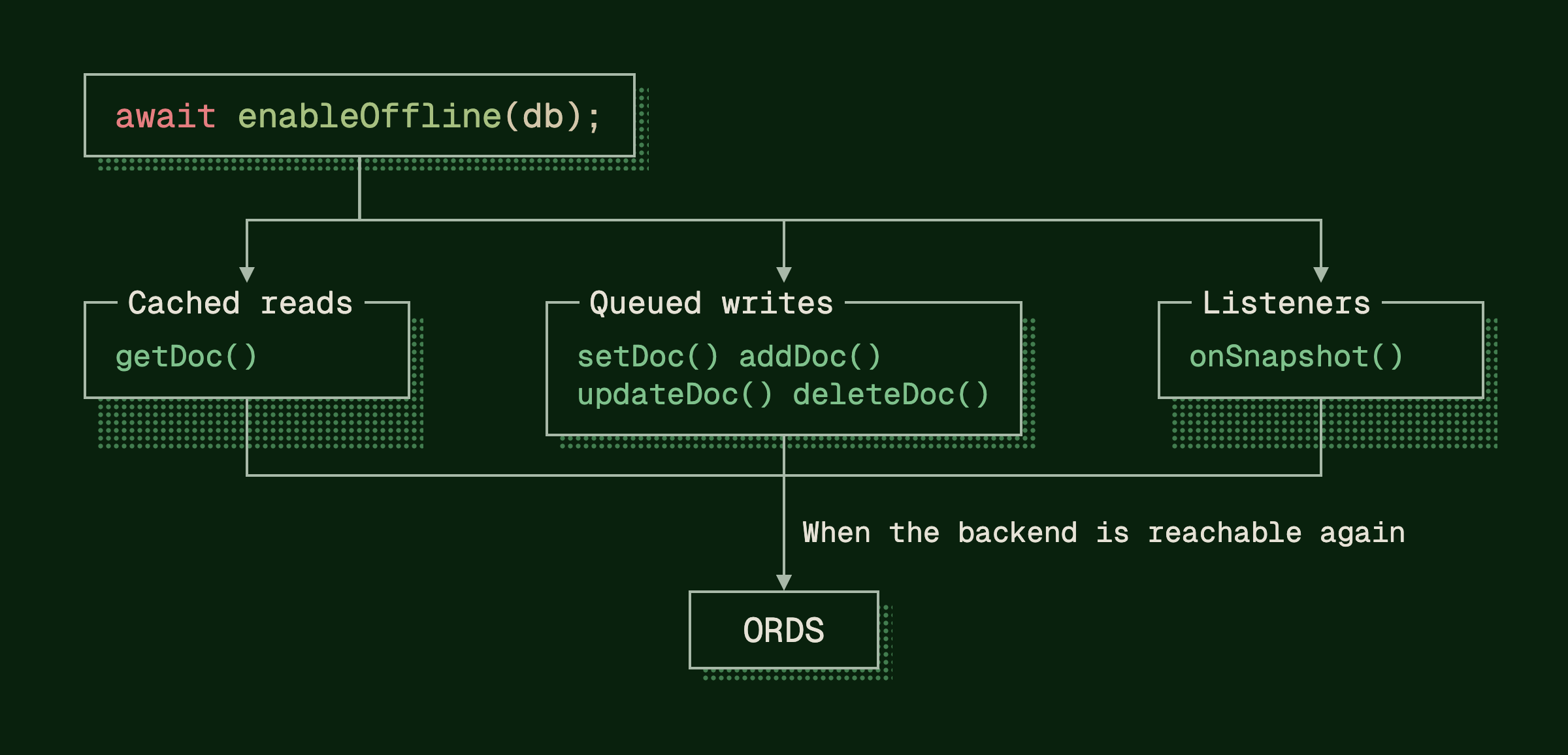
With offline support on, the SDK keeps a local view of the documents your app has read or written. The SDK uses that local view three ways:
- Cached reads. Documents the app has already loaded can be read again without contacting the backend.
- Queued writes.
setDoc(),addDoc(),updateDoc(), anddeleteDoc()apply to the local view immediately, then wait in a queue for delivery to the backend. - Listeners.
onSnapshot()listeners receive cached data and your local changes right away, before the backend confirms them.
When the backend is reachable again, the SDK refreshes the cache and sends the queued writes through ORDS. Security Rules are still checked on the backend as each write arrives. If one is rejected, the SDK rolls back its local change, along with any later queued writes to the same document.
Turning it on
Offline support is opt-in. Call enableOffline() once on your database instance, before any reads, writes, or listeners:
import { initializeApp } from "fusabase/app";
import { enableOffline, getOracledb } from "fusabase/oracledb";

const app = initializeApp(fusabaseConfig);
const db = getOracledb(app);

await enableOffline(db);
That's the only setup step. Your existing getDoc(), setDoc(), and onSnapshot() calls keep working, now against the local cache. By default the cache lives in IndexedDB, the browser's built-in database, so cached documents and unsent writes survive a page reload or browser restart.
What changes
One thing does change once offline is on: await setDoc(...) resolves when the write is stored in the local queue, not when the backend accepts it. That's what lets your app keep working while the network is down, but it means the promise no longer tells you the backend has the write.
When the next step needs your earlier writes to have reached the backend, call waitForPendingWrites(). It resolves once they've been acknowledged or rejected, so it tells you syncing is done, not that every write was accepted:
import { doc, setDoc, waitForPendingWrites } from "fusabase/oracledb";

const recipeRef = doc(db, "recipes", "cookies");

// Resolves once the write is in the local queue.
await setDoc(recipeRef, { title: "Chocolate Chip Cookies" });

// Resolves once writes queued before this call are acknowledged or rejected.
await waitForPendingWrites(db);
It only covers writes queued before the call, and while the app is offline it stays pending until the connection comes back.
To show sync state in the UI, read the snapshot's metadata. metadata.hasPendingWrites is true when the snapshot includes local changes the backend hasn't confirmed yet. metadata.fromCache is true when the data came from the cache and may not be current. Pass includeMetadataChanges: true so the listener also fires when only those flags change, such as when a pending write is confirmed:
import { collection, onSnapshot } from "fusabase/oracledb";

const unsubscribe = onSnapshot(
  collection(db, "recipes"),
  { includeMetadataChanges: true },
  (snapshot) => {
    const { hasPendingWrites, fromCache } = snapshot.metadata;

    syncStatus.textContent = hasPendingWrites
      ? "Waiting to sync"
      : fromCache
        ? "Showing offline copy"
        : "Synced";
  }
);
Before you ship it
- Web only, documents only. Offline support is in the modular
fusabaseJavaScript SDK. It isn't in the namespace SDK or in the iOS, Android, and Flutter SDKs in this release, and it doesn't add offline behavior to Auth or Storage. - The cache only knows what this browser has seen. Cached queries can be stale or incomplete. An offline
updateDoc()or mergedsetDoc()fails if the document was never loaded, so load what users will edit while you're online. - Security is enforced at the backend. Security Rules, App Trust, and authentication run when a queued write reaches the backend, not in the cache. IndexedDB data stays on the device between sessions; on shared machines,
{ persistence: "memory" }keeps nothing after the page closes.
Tell me what you need next
Offline support is in fusabase 26.3 and later (npm install fusabase). The full guide covers what this post skipped: cache size, multi-tab sync, cache vs. server reads, batched writes, and network control.
If you'd like to explore offline support on iOS, Android, or Flutter, or you hit something it doesn't handle, let me know: killian.lynch@oracle.com, LinkedIn, X, or an issue on fusabase-js-sdk.